

Category
Video creation & editing platform
Primary Use Case
Enables marketers, content teams and creators to rapidly build high-quality videos using templates and AI-powered tools.
Ideal Users
Marketing teams, social-media strategists, educators, small business owners, content agencies.
What This Tool Helps You Achieve
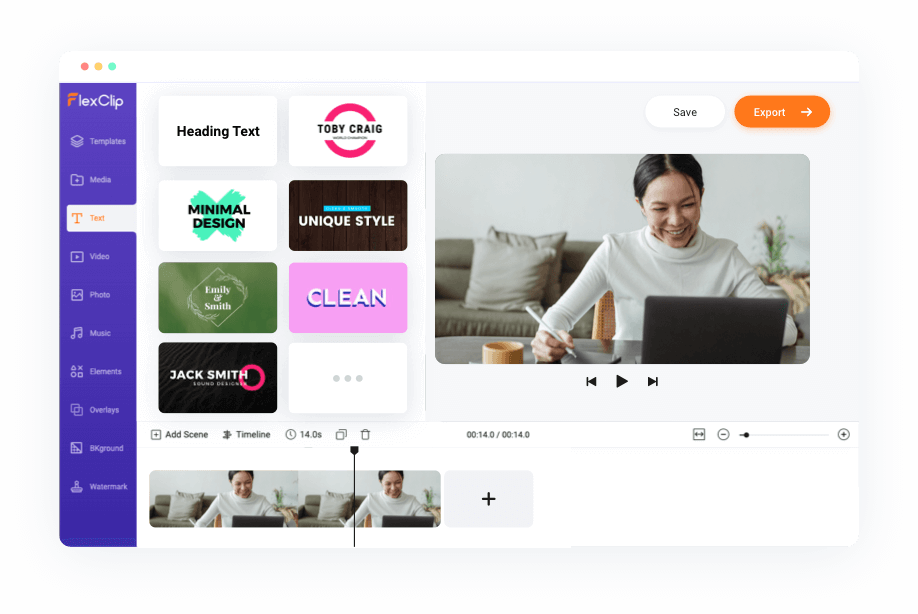
FlexClip transforms the video production workflow from days of complex editing to minutes of drag-and-drop creation. Whether you’re building a 30-second social clip, a product promo, an explainer video or a classroom summary, you can start with templates or from scratch, add text, music, subtitles, transitions and export in multiple formats—all without being a video-editing pro.
Why It Matters
Video content continues to dominate engagement across social platforms and websites. According to numerous industry analyses, video drives higher click-through, longer dwell time and better shareability. A tool like FlexClip empowers non-technical teams to keep pace with this demand by lowering the entry barrier to video creation—thus enabling brands in APAC (and beyond) to scale content production without large video-editing budgets or specialist hires. The net effect? Faster go-to-market, more agile storytelling, and greater creative flexibility.
Key Features at a Glance
-
Drag-and-drop timeline and media uploads for simple video editing.
-
6 000+ pre-built templates across use-cases (business promo, social media, real estate, wedding, tutorial, etc.).
-
Rich stock library of video clips, images, music and sound-effects.
-
AI tools: text-to-video generator, image-to-video, auto subtitles, voice-overs, URL or document → video conversions.
-
Collaboration features and cloud-based editing meaning teams can work together and share assets easily.
-
Export options up to 4K (premium plan) and for multiple aspect ratios for social platforms.
Where It Excels
-
Ideal for marketing teams that must produce regular video content but don’t want to invest heavily in professional editing software or training.
-
Useful for cross-channel campaigns where you need different video formats (social stories, square posts, landscape intros) and quick turnaround.
-
Helpful for educators or trainers seeking to create engaging video lessons or promos without wrestling with complex GUIs.
-
Strong fit for agencies working with small-to-medium-sized clients where time and resources are constrained but creative output must still look polished.
Limitations to Know
-
While the core editing features are strong, for highly bespoke visual effects or cinematic video work, specialist software may still be required.
-
Free tier will carry limitations in resolution, export length, branding or watermark removal (as is common in freemium tools).
-
Performance may depend on browser and system-spec; long-form or high-complexity edits may become sluggish in standard hardware.
-
Some advanced AI or 4K exports are locked behind premium plans.
Pricing Snapshot
-
Free plan: Basic editing and export capabilities, ideal for trial and light usage.
-
Paid tiers: Unlock higher resolution exports (4K), full template and stock libraries, collaborative features, brand-kit elements, no watermarks.
-
Enterprise/Business plans: Customisation, team-licensing, additional brand-control and usage rights.
(A specific pricing per region needs checking on the vendor site.)
Verdict
FlexClip offers an excellent balance of simplicity and power for teams that need to move fast in video content creation. It allows non-designers and non-editors to craft visually engaging videos without a steep learning curve. For organisations in APAC looking to scale up storytelling, social-first content or internal communications, it deserves strong consideration. If you already own a heavy video-editing stack, you may treat FlexClip as the agile, “campaign ready” tool in your toolkit rather than the primary grade suite.
Tool Scorecard
| Metric | Rating (out of 10) |
|---|---|
| Ease of Use | 9 |
| Speed of Output | 8 |
| Enterprise Team Fit | 7 |
| Innovation (AI Features) | 8 |
| Value for Money | 8 |
How Organisations Use This Tool
-
A marketing team at a regional brand quickly puts together a product announcement video, starting from a FlexClip template, adding branding, voice-over and subtitle automation, then exporting it for YouTube, Instagram and LinkedIn.
-
An educational institution creates short lesson-intro videos and converts PDFs or slides into video format using AI features, aiding remote learning and flipped-classroom delivery.
-
A content agency working with multiple small clients uses FlexClip’s stock library and templates to generate promo videos rapidly, freeing time to focus on strategy rather than editing minutiae.